Windows 10 Iso File Download Mac Updated
Windows 10 Iso File Download Mac
Install Windows x on your macOS computer using Boot Army camp Banana
On this page:
- Overview
- Pre-installation notes
- Installation guide
- Step one: Check for macOS updates
- Step 2: Confirm your macOS version and processor
- Step 3: Turn off FileVault
- Footstep iv: Download Windows x
- Stride 5: Use Kick Military camp Assistant
- Stride six: Install Windows x
- Footstep vii: Configure Windows x
- Step 8: Create your Windows ambassador account
- Footstep 9: Install support software
- Footstep x: Configure Windows Wi-Fi settings
- Footstep 11: Configure the default boot operating system
- Switch operating systems
- Go assist
Overview
If you wish to run both macOS and Windows on a single Mac computer, UITS recommends using Apple's Boot Camp utility to install Windows 10 on your Intel-based Mac. In macOS, the Kicking Camp Assistant app will help you partitioning your Mac hard bulldoze to adapt both operating systems, and so you can install Windows from an installation disk or an ISO paradigm stored on a USB flash drive.
Of import:
Partitioning your system's hard drive with Boot Camp Assistant may erase all your data. Before proceeding, back up/copy all personal files (documents, pictures, music, videos) to a flash bulldoze, external difficult drive, or cloud storage. Alternatively, you lot can employ Time Automobile with an external difficult drive to back up your entire Mac computer; for instructions, encounter Mac Basics: Time Machine backs up your Mac. If you need assistance setting upwards Time Machine, contact your campus Back up Center.
Pre-installation notes
- Brand sure your estimator meets these requirements:
- At least 80 GB of free hard bulldoze infinite
- You lot have either the keyboard and mouse (or trackpad) that came with your Mac, or a USB keyboard and mouse
- Obtain a USB flash drive (at least 16 GB).
- During installation, yous volition be prompted to enter an business relationship name and password; this is for the administrator account, and should not be the one yous generally utilise. Y'all also volition be prompted to enter your time zone.
- Ensure that the reckoner is plugged into a power source, every bit the entire procedure may accept several hours.
Installation guide
Notes:
- These instructions are intended strictly as a guide for installing a fully updated 64-bit version of Windows 10 on an Intel-based macOS Big Sur xi.x or newer computer at IU. If your computer cannot run macOS High Sierra 10.13.x or newer, you'll demand to follow Apple's Boot Army camp Help: Install Windows on your Mac.
- Kick Camp requires an Intel processor. Macs with Apple Silicon (M1) processors cannot install Windows.
- Perform these steps in order.
Step one: Check for macOS updates
Before configuring Kicking Military camp, information technology is critical to make certain that your Mac's software is up to appointment, which lessens the risk of encountering problems during installation:
- In the menu bar, from the carte du jour, click .
- On the left, go to .
- If there are updates for your computer, in the upper correct corner of the window, click .
If you're prompted, enter an administrator's username and countersign, and if prompted, allow your computer to restart.
When your reckoner restarts, cheque for additional updates by repeating the steps above. Repeat the process until in that location are no new updates in Arrangement Preferences.
Step 2: Ostend your macOS version and processor
In the carte bar, from the carte du jour, click . The window will brandish the version of macOS on your computer. If you lot aren't running macOS Loftier Sierra 10.13.x or newer, yous need to follow Apple's Boot Camp Assist: Install Windows on your Mac. If your processor or scrap name doesn't include "Intel", you cannot install Windows with Boot Camp.
Step iii: Turn off FileVault
To continue, you lot need to divide your Mac's hard drive into a section for macOS and a section for Windows. This process is called partitioning a disk, and requires that you disable FileVault (whole-deejay encryption provided by Apple tree):
- In the menu bar, from the menu, click .
- Click .

- Click . The FileVault control panel volition open, locked by default.
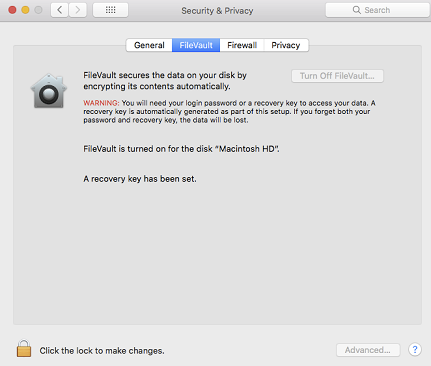
- Before yous can disable FileVault, it requires you to unlock the command panel to show that you're an ambassador on your figurer. To do so, click the lock icon. Enter your administrator username (if required) and your password.
- You'll then be able to click . To confirm, click .
Decrypting an encrypted bulldoze can take some fourth dimension, the verbal time existence determined by how much information is on your disk, the disk size, and your calculator's hardware capabilities.
Step 4: Download Windows 10
Note:
The version of Windows x on IUware volition non work with Boot Army camp; yous'll need to download Windows directly from Microsoft, and use a production key you get from IUware.
Downloading Windows x Education takes some time, depending on the speed of your internet connectedness. Practise not effort the download on a metered connectedness, such as a tethered cell phone.
- Get a product fundamental:
- Get to IUware.
- On the left, click .
- Click Windows 10 Educational activity, and cull the 64-scrap version.
- Click . If prompted, log in with your IU username and passphrase.
- Write the production fundamental (a serial of messages and numbers that resembles "XXXXX-XXXXX-XXXXX-XXXXX-XXXXX") on newspaper, since you won't exist able to open annihilation on your Mac while Windows is existence installed.
- Download Windows 10:
- Navigate to Microsoft'due south Software Download page, and click .
- In the drib-down list, choose , and click .
- Select the appropriate linguistic communication, and click .
Pace 5: Use Boot Military camp Assistant
Important:
Back up your files if you haven't yet done so. Partition your organisation's difficult drive with Boot Campsite Banana may erase all files. To larn more, run into Dorsum up your Mac. For details about backing upward your documents and content using cloud services at IU, see Store and share your private files at IU.
The Kicking Military camp Banana volition help guide you through the process of adding Windows to your Mac.
- For an piece of cake way to brainstorm, click
 , the Spotlight icon. In the search bar, type
kick campsite assistant, and press . - The next screen describes what Boot Camp Assistant does, and warns you to back up your disk if you lot haven't already done so. Click .
- Kicking Military camp Banana will automatically remove older Time Machine snapshots and cached iCloud to make infinite for Boot Camp. This process may take a long time to complete. If you wish to skip this process, click .
- To select the installation tasks to complete, brand certain , , and are all selected.
Before continuing, make sure a USB bulldoze (at to the lowest degree 16 GB) is connected to the system, and be aware that the unabridged contents of that flash drive will be erased.
- On the next screen, make sure the ISO file you just downloaded from Microsoft and the appropriate wink bulldoze are both selected. Click .
- To ostend that the drive will be overwritten, click .
This step volition take some fourth dimension, depending on your computer'south hardware capabilities and your internet connection speed. Brand sure your computer remains plugged into an AC outlet during this process.
- To begin creating a partitioning on your Mac'southward hard disk to hold Windows, authenticate with your ambassador password.
- Use the slider between the Mac and Windows icons to select a size for the Windows sectionalization.
UITS recommends that you utilise fourscore GB for simply Windows, and ninety GB for Windows plus Microsoft Function.
- Click .
This process will take several minutes to consummate. One time the division is created, your Mac volition restart and begin installing Windows 10. You may exist prompted several times for your administrator countersign.
Step 6: Install Windows 10
Follow the Windows installation wizard to begin installing Windows. You'll be prompted with several questions about how to configure Windows for your needs.
These steps will take some time, depending on your computer's hardware capabilities. Make sure your calculator remains plugged into an Air conditioning outlet during this process.
- Select the linguistic communication, time and currency format, and keyboard or input method for Windows. Click .
- On the next screen, enter the product key you lot got from IUWare.
- Choose the version of Windows that the production fundamental unlocks (Windows ten Education) and click .
- Read and take the license terms, and click .
- Choose the sectionalization on which Windows will be installed, called "BOOTCAMP". Click .
- To ostend that yous wish to format the partition, click . To continue, click .
- The installer will re-create Windows files and install any features and updates required. When prompted, click to restart your Mac and continue the Windows Installation process.
Step seven: Configure Windows 10
After Windows restarts, yous'll need to practise some configuration.
Annotation:
Microsoft's digital assistant, Cortana, volition help guide you lot through this process. If you are wearing headphones, remove them while your calculator is restarting. Until you can install the Boot Campsite support software, you lot may non be able to control the volume of Cortana with the volume keys on your computer.
- To select the appropriate region, choose , and click .
- To select the keyboard layout, make sure is selected, and click .
- If you would like to add a secondary keyboard layout, use the adjacent screen to do so; otherwise, click .
- On the "Let'due south connect you lot to a network "screen, click .
Step 8: Create your Windows administrator account
Note:
The Windows administrator account y'all create should not be an business relationship you use for general use of this figurer.
- To create your account, type your proper name and click .
- Type a password and click . Do non employ your IU network passphrase.
- Confirm your password by typing it again, and click .
- Select a series of three security questions, clicking later each one.
- Decide whether or non you lot want to employ Cortana in Windows. Decide what privacy settings you lot would like to enable or disable, and click .
Windows will do its last configurations. This step will take some fourth dimension, depending on your calculator's hardware capabilities. Make certain your reckoner remains plugged in to an AC outlet during this process.
Pace nine: Install back up software
Once Windows has started (may take some time), the Boot Camp installer will walk you through installing Apple'southward support software.
- To begin the process, click .
- Read and accept the license agreement, and click . All the Apple-specific software you need to run Windows efficiently on your reckoner will be installed.
- When the installer finishes, click .
- To restart the computer, click .
- When the computer restarts, click the trackpad or press whatever key to display the login field. Log in with the password you created earlier in the configuration procedure.
Step 10: Configure Windows Wi-Fi settings
Note:
eduroam is replacing IU Secure as the default wireless network for students, kinesthesia, staff, and affiliates on all IU campuses. As of May 26, 2021, IU Secure is no longer bachelor in the residence halls, and will fully retire in the most hereafter. All new wireless connections should use eduroam; run into Connect to eduroam.
- eduroam:
The simplest and nearly secure way to connect to eduroam is to use the Eduroam Network Setup Tool. Alternatively, you can utilise the instructions below to connect manually.
To connect manually, select from the listing of available wireless networks, and enter your full IU email address (for example,
johndoe@iu.edu) and passphrase.Notes:
- If you connect to eduroam at an establishment other than an IU campus, you'll need to use the IU VPN to access some resource (such every bit remote desktop, library resource, and section drives).
- For troubleshooting tips, see Troubleshoot your eduroam connection.
- IU Secure: To connect, select from the list of bachelor wireless networks, and enter your IU username and passphrase.
You have finished installing Windows on your Mac. If you need to install Microsoft Role, see About Microsoft 365 at IU.
Step 11: Configure the default boot operating arrangement
You have the option to kicking to either Windows or macOS when starting your Mac. You can also select 1 operating system for the computer to showtime by default.
- To shut downwards your Mac while you're in Windows, from the carte du jour, click the button, and so click .
- To boot into macOS, with the power off, printing and agree the
Optionkey and ability on your Mac. - Hold the
Optioncentral until you see two hd icons and a Wi-Fi network selector. Boot into macOS past clicking (y'all'll select the default kick operating system momentarily). - From the Startup Disk command console, click the menu. Click , and then .
- To unlock the settings, click the Lock icon, and and then type your ambassador passphrase.
- To select the default boot operating arrangement, click the disk that correlates to the operating system y'all would like to select. For macOS, choose ; for Windows, cull . If y'all would similar to boot into the selected operating organization now, click .
Switch operating systems
Whenever you would like to switch operating systems:
- Shut downward the computer.
- Printing and hold the option key and power on your computer by pressing and releasing the power push button.
- When you see ii hd icons, release the choice key.
- Click the hd icon that corresponds with the operating system you would like to boot. For macOS, choose ; for Windows, choose .
This is document bewm in the Knowledge Base.
Concluding modified on 2021-12-21 13:28:37 .
Windows 10 Iso File Download Mac
Posted by: burkhartbannionest.blogspot.com

Post a Comment for "Windows 10 Iso File Download Mac Updated"