What's the Best Malware Virus Cleaner Free Download for Samsung Galaxy S5

Updated on: January ane, 2022
Short on time? Here'southward the all-time free Android antivirus in 2022:
- 🥇 Avira : Provides real-time malware protection, anti-theft protection, a privacy scanner, device clean-upward tools, app locking, network scanning, and a limited VPN all 100% free. Get Avira'due south complimentary Android antivirus at present.
I tested all of the free antivirus apps in the Google Play Store — after weeks of testing, I only found a few products which I'm confident can go on Androids well-protected confronting malware.
Nigh of the free Android antivirus apps I tested were ineffective against malware, filled with annoying ads, or falsely advertised equally costless — a lot of "free" apps are really just free trials or very limited versions of the premium apps. Some were even simulated apps designed to harvest user data!
While I did find a few adept complimentary apps, no gratis app is going to provide all of the security tools you lot need to keep your Android 100% safe. If you lot're looking for an antivirus that can fully protect you and your devices, you'll need a premium product (I recommend Norton's fantastic Android app).
But if yous simply demand bones protection, in that location are a few free Android antivirus apps that are pretty good — offering free real-time or on-demand virus scanning, gratuitous anti-theft protections, and a handful of good extra features to strengthen your Android's mobile security.
Here'due south a summary of the best costless Android antivirus apps in 2022:
- 1.🥇 Avira — Best free Android antivirus in 2022.
- 2.🥈 McAfee — First-class antivirus with anti-theft features and a Wi-Fi scanner.
- 3.🥉 BullGuard — Cloud-based antivirus with a privacy monitor and anti-theft.
- 4. Panda Dome — Adept malware scanner with Android smartwatch compatibility.
- 5. Kaspersky — Intuitive app with a skillful scanner (merely no real-time protection).
- Bonus. Traced — Privacy-focused app with a expert Wi-Fi network scanner.
- Frequently Asked Questions near Antivirus Apps for Android.
How I Rated the Best Free Antivirus Apps for Android:
- 100% complimentary. Many antivirus companies try to fob users with a free trial. Users get comfortable using the app and then forget that they demand to abolish before the trial is over, and so they end up paying. If you know you're going to purchase a mobile antivirus from a reputable visitor, a complimentary trial is a great fashion to test out the service earlier you buy it. Otherwise, it's just a marketing tactic to become you lot to download the app and promise that you forget to cancel before the trial flow is over. All of my superlative 5 free antiviruses here are actually gratuitous.
- Security. I downloaded hundreds of Android-specific malware files, sketchy apps, and fifty-fifty ransomware files to ensure that the antivirus apps I recommend are able to detect and remove all types of malware. I also tested internet security features similar anti-phishing protection and Wi-Fi scanners to ensure these products can keep Androids prophylactic from the latest spider web-based threats.
- Operation. Nothing is worse than a security app that drains your bombardment and kills your Android's operation. I made sure all of the apps I recommend tin increase your security without crashing your phone or tablet.
- Ease of utilise. I tested each feature to ensure that these apps make their features piece of cake to access and understand for all users. All of the apps on this list also provide expert integration with Android Bone and Chrome Bone.
Summit Brands That Didn't Make the Cut:
There are many antivirus apps for Android thatdidn't arrive into my top 5. Hither are a few well-known brands you may have been expecting to run into on this list:
- Norton. Norton'due south Android antivirus is one of the best and most affordable options out there. But Norton doesn't offering a free plan. All the same, if you lot desire premium protection for your mobile phone or tablet, it doesn't get better than Norton.
- TotalAV. TotalAV offers a good fix of costless features for Android, only it lacks existent-time malware protection. However, TotalAV's paid Android antivirus includes some pretty proficient features, including real-fourth dimension protection, app locking, and a secure VPN.
- Bitdefender. I actually dear Bitdefender'south total-scale antivirus suite, but its costless Android app is only a uncomplicated antivirus scanner. While it'south really easy to utilise, it's merely not amend than the rest of the products on this list.
- Avast/AVG. In that location are a few review sites that are still recommending Avast and AVG, but SafetyDetectives is not ane of them. While Avast and AVG maintain a widespread web presence, they were implicated in some pretty serious privacy violations. You tin become here to read more most the full story of how they were secretly selling user information.
🥇ane. Avira Antivirus Security for Android — Best Free Antivirus for Android in 2022
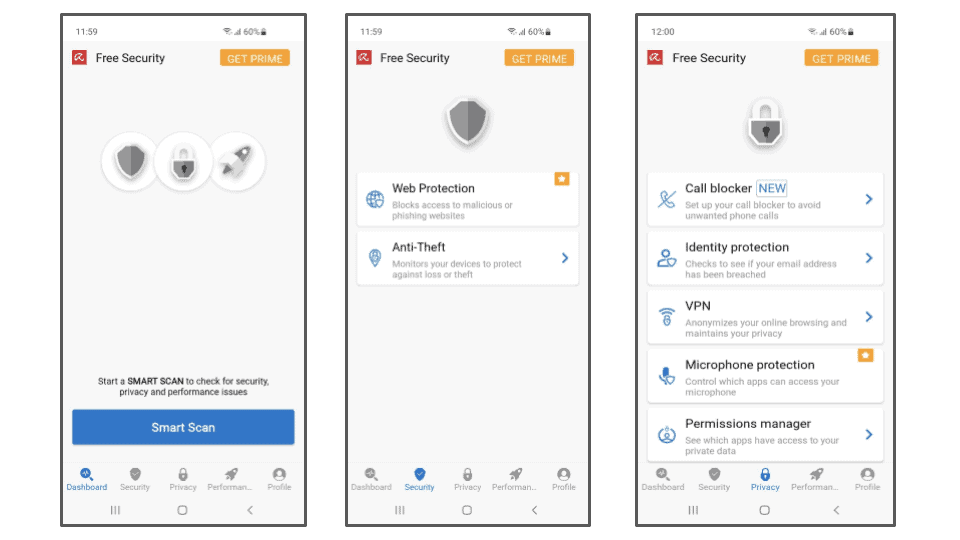
Avira Antivirus Security for Android is my superlative free Android antivirus in 2022 — it has an excellent virus detection and removal engine forth with a wide range of additional security features, all inside an intuitive dashboard.
During my tests, I tried to download a huge range of Android malware samples to my Samsung Milky way S20 — including viruses, trojans, and spyware. All of the malware files were detected, blocked, and removed from my phone — and because Avira's scanner is cloud-based, at that place was very little strain on my battery life or system resource.
In improver to real-time malware protection, Avira'southward free Android app provides far more features than any other competitor, including:
- Anti-theft protection.
- App privacy scanner.
- VPN (100 MB daily limit).
- App lock.
- Data alienation scanner.
- Wi-Fi scanner.
- Device optimizer.
Avira's anti-theft features are really useful — after logging into Avira'southward online dashboard, I was able to track my phone's location in real time while my partner took information technology for a drive around our neighborhood. I was also able to trigger a very loud alarm.
Avira's privacy scanner is actually proficient, too. Information technology analyzed all of the apps on my device and notified me which ones had access to my contacts, images, and browsing data. I was pretty surprised to detect some free games on my device were actually harvesting my data even when I wasn't playing them!
Avira's free program is past far the best on the market, but it does have some limitations — like well-nigh costless Android antiviruses, information technology doesn't provide anti-phishing protection. To get anti-phishing protection too as microphone and camera protection, you need to upgrade to Avira Antivirus Security Pro for Android. At that place'southward also Avira Prime number Mobile , which adds a secure password managing director and a VPN with unlimited browsing data. Avira's premium mobile protections are also all bundled with the excellent Avira Prime number antivirus bundle, which offers coverage for up to 5 devices, including Android, Windows, macOS, and iOS.
Bottom Line:
Avira provides the most features of any gratis Android antivirus — and they're all very skillful, easy to employ, and work as promised.Avira's antivirus scanner detected all of the malware samples in my testing, and its anti-theft protections, app privacy scanner, and Wi-Fi scanner are all really good internet security tools. I like Avira'southward VPN a lot, but 100 MB is a pretty minor daily limit. In addition to these gratuitous tools, Avira'southward paid mobile plans too add together anti-phishing protection, a VPN with no limitations, and even a password managing director. Avira'south paid plans all have a risk-gratuitous 30-day money-back guarantee.
Download Avira for Costless Now
Read the full Avira review >
🥈ii. McAfee Mobile Security Free — First-class Antivirus Protection with the Best Android Theft Protection
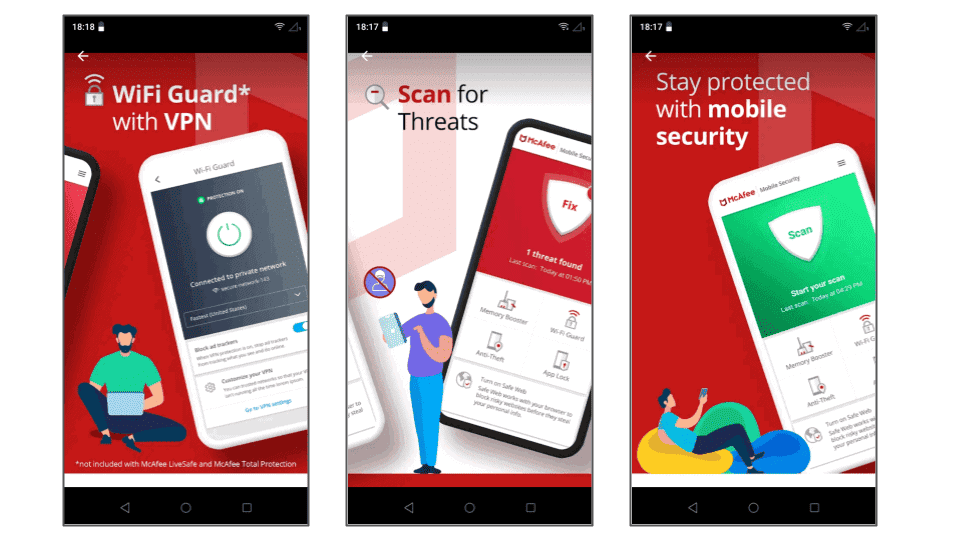
McAfee Mobile Security Free offers some not bad free features — but I particularly dear McAfee's theft protection tools. McAfee's anti-theft features can be accessed from McAfee's convenient online dashboard — if your telephone gets lost or stolen, McAfee provides the following tools:
- CaptureCam — After iii failed PIN codes, CaptureCam takes a selfie from the front-facing photographic camera.
- Alarm — If you lose your device, y'all can trigger a very loud alarm via your online dashboard.
- Remote wiping — If your device gets stolen, you lot can remotely delete your sensitive information.
- GPS location — If you tin't notice your device, y'all can come across information technology on a map with the device'southward GPS.
McAfee's costless antivirus app also includes a good array of additional features, including real-time malware protection, Wi-Fi network scanning, device optimization tools, and an app privacy scanner that's similar to Avira's. I was impressed with all of McAfee's features, although during my tests McAfee missed one spyware app that Avira detected.
McAfee's complimentary Android programme is pretty practiced, but it lacks some of the important features that are included in McAfee's paid plans — McAfee Mobile Security Standard adds anti-phishing protection, app locking tools, and file backup tools. And McAfee Mobile Security Plus also has a VPN (no limits) and an advanced advertizement-blocker.
While McAfee's paid Android plans are a scrap more than expensive than some competitors' premium apps, if you bundle the Android antivirus app with i of McAfee's 2-yr Total Protection plans (upward to 10 devices beyond all operating systems), it'due south one of the best-value antivirus packages of 2022.
Bottom Line:
McAfee's free antivirus appprovides real-time malware scanning, Wi-Fi network monitoring, app privacy reports, and the best anti-theft features on the market. The remote warning and automatic selfie capture characteristic are super like shooting fish in a barrel to access, customize, and use from McAfee'due south online dashboard. McAfee's free app isn't bad, only it doesn't provide access to some important features — including anti-phishing or a VPN, both of which come up with McAfee's premium Android antivirus app. All McAfee paid plans have a 30-24-hour interval coin-dorsum guarantee.
Download McAfee for Free Now
Read the full McAfee review here >
🥉3. BullGuard Mobile Security & Antivirus Free — Good Cloud-Based Antivirus Protection
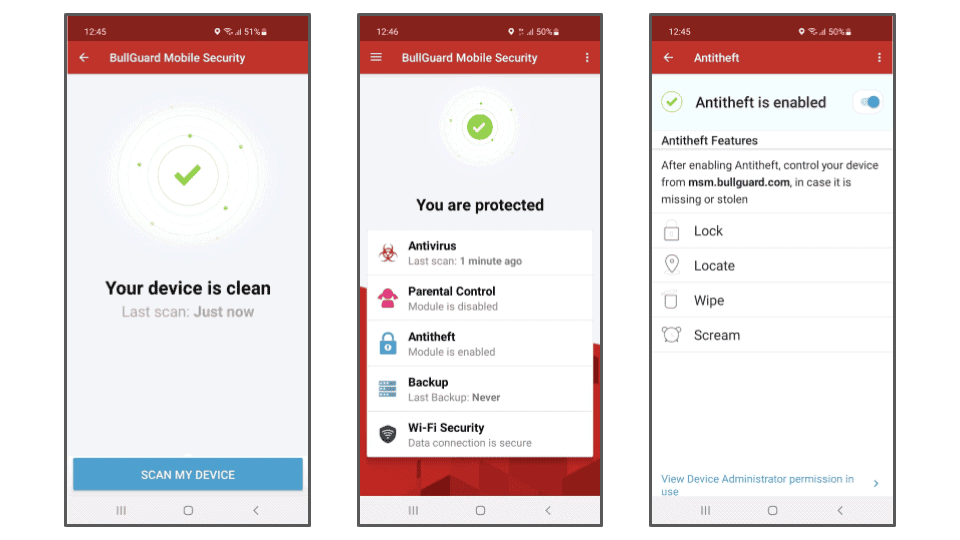
BullGuard Mobile Security & Antivirus Costless provides depression-impact cloud-based antivirus scanning besides every bit good anti-theft features. In my testing, BullGuard was able to cake the vast majority of malware I tried to download onto my Samsung Galaxy, including viruses, spyware, adware, and trackware files. And because BullGuard's scanner fully operates in the cloud, BullGuard didn't bleed my phone'due south bombardment like most other products did.
BullGuard's anti-theft tools are pretty good, too. Y'all tin lock, wipe, and locate your device, as well as trigger a loud scream from BullGuard's online dashboard. All the same, the device locator wasn't as accurate as Avira'south, and BullGuard'due south scream feature wasn't most as loud or scary equally McAfee's.
BullGuard'south costless app also offers automatic device locking if your SIM bill of fare is removed, as well every bit Wi-Fi network scanning and data backup options.
BullGuard's Premium Mobile Security software also provides strong parental controls —allowing parents to remotely monitor photos that are sent and received, show which apps each child has downloaded, and track device location. Users tin besides separately purchase BullGuard's VPN.
Bottom Line:
BullGuard's free Android antivirus is a good app — it's got cloud-based virus scanning, decent anti-theft features, and a Wi-Fi scanner. BullGuard detected almost every single piece of malware on my device, including spyware and information-stealing apps. BullGuard'south premium Android antivirus adds some pretty skillful parental controls. At that place's a 30-day money-back guarantee on BullGuard'south paid plans.
Download BullGuard for Free Now
Read the full BullGuard review here >
four. Panda Dome Free Antivirus for Android — Proficient Antivirus Scanning with Groovy Smartwatch Compatibility

Panda Dome Costless Antivirus for Android offers decent antivirus protection, anti-theft features, an app privacy scanner, and a VPN — and near of these features can be operated remotely from an Android Wear smartwatch!
Panda's real-time scanner didn't block as many malware files as Avira or McAfee, but information technology did detect most malware samples, including all ransomware and spyware — and I got notifications on my smartwatch every time Panda detected a new piece of malware.
Panda besides includes anti-theft features like remote location tracking, data wipe, and device locking. Still, its remote selfie cam and alarm features are just available in the paid version of Panda Dome for Android .
Panda Dome also comes with a complimentaryVPN, but it only includes 150 MB per day, which is barely enough for light browsing. To get the unlimited version of the VPN, you need to upgrade to Panda's comprehensive Panda Dome Premium antivirus suite.
Bottom Line:
Panda's free Android antivirus app provides real-time malware scanning, anti-theft tools, and convenient compatibility with Android smartwatches. I liked beingness able to perform malware scans, wipe data remotely, and even track my device's location from my smartwatch. However, you'll accept to upgrade to Panda's paid Android plan to get remote selfie capture and alarm tools, along with a spam blocker and app locking tools. Users looking to get a VPN with unlimited data should consider the Panda Dome Premium antivirus parcel.
Download Panda Dome Free for Android Now
Read the total Panda Domereview here >
5. Kaspersky Mobile Antivirus Free — Easy to Employ with Decent On-Demand Virus Scanning
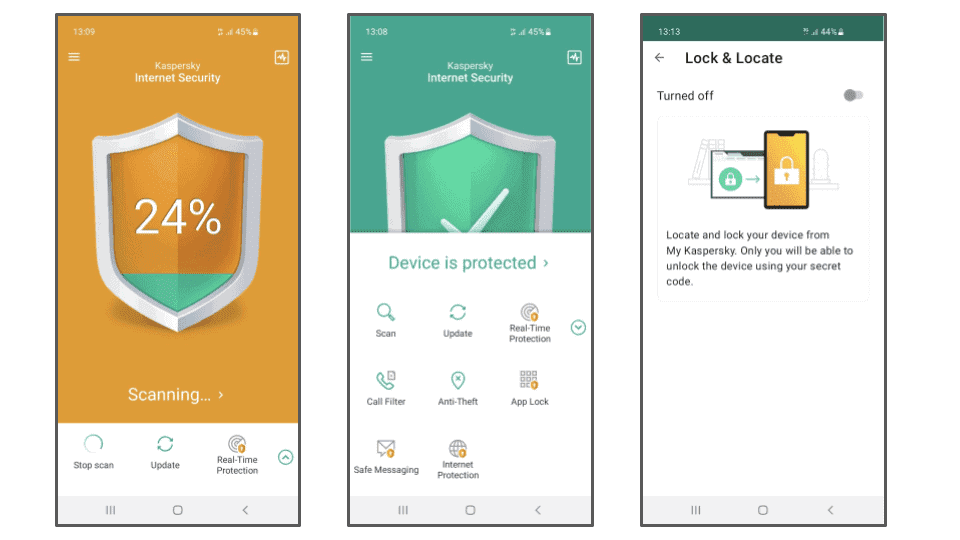
Kaspersky Mobile Antivirus Free is a decent gratis cyberspace security app for Android users — and because it merely provides a couple of free features, it's very easy to employ. You only need to enable a couple of permissions when you install the app and printing the Browse push button when you want to check your device for viruses.
Kaspersky provides good on-demand malware detection (it caught most of the malware files during my testing), just it doesn't provide real-fourth dimension scanning similar Avira or McAfee.
Kaspersky too has free anti-theft protection — which includes remote data wipe, app locking, and a selfie capture function like McAfee'due south CaptureCam. Kaspersky also offers a remote alarm to help locate your device and discourage thieves, and the "Notice My Phone" feature locks your telephone and allows you to bank check its location on the Kaspersky website, your smartwatch, or the Kaspersky desktop app.
Kaspersky even offers the ability to initiate scans from a smartwatch, which is pretty cool — but its smartwatch integration isn't every bit skillful as Panda Dome's.
Kaspersky'due south real-fourth dimension protection, anti-phishing and spider web-filter functions, and app locking tools are only available to premium customers.
Bottom Line:
Kaspersky offersdecent free malware detection and anti-theft protections,only not much else. Unlike the other apps on this list, Kaspersky's free program doesn't take real-time malware scanning — this essential feature is reserved for paying users, which besides get admission to good web protection and app locking.
Download Kaspersky Free for Android Now
Read the total Kaspersky review hither >
Bonus. Traced — Privacy-Oriented App with Skilful Network Monitoring

Traced is a completely free internet security app for Android — information technology provides good malicious app detection, advanced network monitoring features, anti-phishing protection, and an intuitive app privacy scanner.
About antiviruses collect scan data (and even browsing data sometimes) for security purposes, so privacy-minded users volition capeesh that Traced doesn't gather whatsoever user information while it's running. In fact, dissimilar nearly of the apps on this listing, Traced doesn't ask for Accessibility or Location permissions, which I really appreciate (the less my apps know about me, the improve).
Traced uses machine learning to notice malicious apps without excessively draining bombardment life — information technology blocked all of the ransomware and cryptojacking apps in my testing, but it missed a small-scale percentage of the spyware apps on my device.
Traced also provides one of the well-nigh helpful Wi-Fi network monitoring features of whatsoever Android app. Every time you connect to a Wi-Fi network, you receive a detailed written report about each network'southward security profile, along with instructions on whether or non yous should connect to that network.
Traced lacks helpful features like anti-theft protection, a VPN, or parental controls, but information technology provides proficient internet security for Android devices (without tracking user information), and information technology'due south completely free (and it doesn't contain ads).
Bottom Line:
Traced is a completely costless Android antivirus app with a strong focus on user privacy. Information technology comes with expert app scanning and anti-phishing, its Wi-Fi monitor provides excellent network protection, and it doesn't collect any user data.
Download Traced Free For Android Now
Read the full Traced review hither >
Are antivirus apps safe?
The ones on this list are all safe. Simply information technology's important to know that scanning for malware requires deep-level access to the most sensitive parts of your device. Malicious antivirus apps tin easily compromise your privacy and security and steal your info.
I've thoroughly tested these apps, and they're all legitimate, safe, and work exactly as promised. Each app comes from a brand with a strong reputation for creating excellent cybersecurity products. My top choice, Avira Free Antivirus Security for Android , is produced by a visitor with millions of users worldwide and decades of experience in the cybersecurity industry.
Why does Android need an antivirus?
Your Android phone or tablet probably contains sensitive data like personal information, banking information, social media, personal pictures and files, etc. It's also a relatively expensive detail, thus alluring thieves.
And when compared to other platforms like iOS, Android isn't all that secure of an operating organization. Android Bone is notable for having tons of indie developers, coders, and modders around the earth. Unfortunately, this also makes Android a playground for hackers.
Ransomware, spyware, cryptojacking software, surveillance apps, and other malware compromise Android users every unmarried day. Android users besides face risks from phishing sites, smishing links, and even pickpockets.
To keep your device prophylactic from all of these threats, you need to take a good Android antivirus with real-time protection, web protection, anti-theft tools, and other additional features. My favorite Android antivirus is Norton, but it'southward non free. If yous want a complimentary antivirus, go with Avira.
What kind of features tin you get with an Android antivirus app?
In improver to detecting and removing malware, a free Android antivirus app can:
- Keep yourpersonal information private (I recommend Avira Costless Antivirus Security for Android).
- Prevent loss or theft of your device (McAfee Mobile Security has some particularly effective anti-theft tools).
- Ensure you lot're connected to a secure Wi-Fi network (McAfee can besides do this).
Most antivirus apps also offer additional paid premium features, and for every free app out there, in that location are dozens more premium apps. If your phone contains sensitive info that y'all don't desire getting out, it's ever amend to become with a low-toll premium option like Norton.
The Best Free Android Antivirus Apps in 2022:
Updated on: January 1, 2022
DOWNLOAD HERE
Posted by: burkhartbannionest.blogspot.com

Post a Comment for "What's the Best Malware Virus Cleaner Free Download for Samsung Galaxy S5"